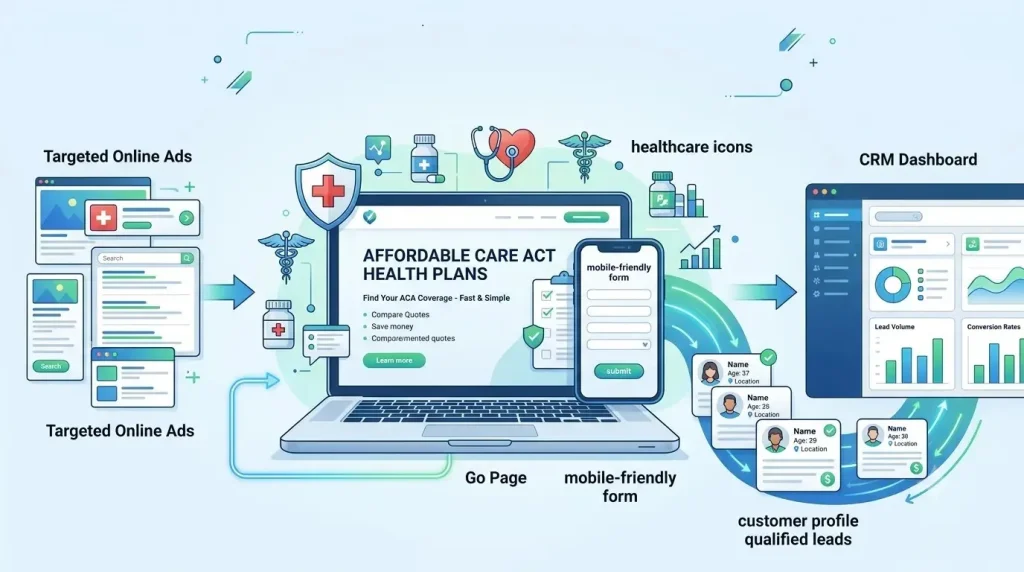
Your wasted clicks stop when certified ads connect with focused ACA landing pages. Many agents buy traffic without clear targeting. They get weak calls, fake forms, and missed enrollments.
I have worked in lead generation for over 20 years. I see the same leaks often. Strong Google Ads campaigns match search intent, licenses, locations, and fast follow-up.
This guide shows how to build a compliant ACA lead generation system. You will learn targeting, pages, forms, tracking, routing, and profit checks.
Verify Eligibility to Advertise ACA Plans on Google
ACA advertisers need active licenses, G2RS approval, Google certification, and Marketplace standing. Missing one item can stop every ad.
Customers often launch first and verify later. That mistake creates review delays, wasted setup work, and lost open enrollment days.
Use this launch order:
- Confirm licenses and appointments.
- Finish CMS training.
- Complete G2RS certification.
- Complete Google certification.
- Check every ad and page.
Obtain G2RS Health Insurance Provider Certification
G2RS certification proves your company can promote or sell health insurance. G2RS checks licenses and ACA registration across served areas. Complete Google Health Insurance and ACA Advertiser Certification
Google requires health insurance certification before United States ads can run. ACA keyword bidding needs the added ACA certificate. Maintain Marketplace Registration and Annual CMS Training
Marketplace agents must renew registration and training each plan year. CMS offers full training for new agents and shorter training for returning agents. Confirm State Producer Licenses and Carrier Appointments
Each agent needs active authority where consumers receive enrollment help. CMS validates health-related authority and points agents toward state license records. Verify Advertiser Identity, Domain, and Account Eligibility
Google must connect the advertiser, business, account, and website. Advertiser verification checks identity and business operations for required features. Prepare for Google Ads Policy Reviews and Appeals
Strong appeals use facts, matching records, and corrected pages. Google allows certified healthcare ads in approved settings, often with limited eligibility. Define Your ACA Lead Generation Goals and Markets
Clear goals connect ad spend with qualified leads and completed enrollments. Form counts alone hide poor sales results.
I start with one market, one offer, and one close goal. This focus makes testing faster and cleaner.
Define a Qualified ACA Lead and Completed Enrollment
A qualified ACA lead matches location, contact, need, and agent reach. A completed enrollment means the application reached your chosen final status.
Compare Federally Facilitated and State-Based Marketplaces
Marketplace type changes training, links, dates, and enrollment steps. CMS lists 21 state-based exchanges for plan year 2026. Identify States, Counties, and ZIP Codes With Enrollment Demand
Demand maps show where search volume and agent access overlap. Customers often target whole states before checking local close rates.
Confirm Carrier and Plan Availability by Service Area
Ads should promise help only where real plans and carriers exist. Carrier footprints can change across counties and plan years.
Advertise Only Where Licensed Agents Can Enroll Consumers
Target only areas supported by licensed and available agents. This rule protects customers from wasted handoffs.
Separate Open Enrollment and Special Enrollment Markets
Open Enrollment and Special Enrollment need separate campaigns. Their dates, messages, searches, and call scripts differ.
Set Target Cost per Qualified Lead and Cost per Enrollment
Set targets from real revenue, close rates, and service costs. Cheap insurance leads can become expensive after bad contact rates.
| Metric | Simple formula | Why it matters |
| Cost per qualified lead | Spend ÷ qualified leads | Shows useful demand |
| Cost per enrollment | Spend ÷ enrollments | Shows sales cost |
| Enrollment rate | Enrollments ÷ qualified leads | Shows agent results |
| Return on ad spend | Tracked value ÷ spend | Shows growth value |
Calculate a Testing Budget From Click and Conversion Assumptions
A testing budget should buy enough clicks for a fair read. Customers often stop after ten clicks and call the campaign broken.
Build a High-Intent ACA Keyword Strategy
High-intent keywords reach people ready to compare or enroll. Broad research terms often bring students, support calls, and job seekers.
This problem happens when one ad group holds every search. Tight groups make ads clearer and pages stronger.

Target ACA Health Insurance and Marketplace Keywords
Use core terms showing direct ACA or Marketplace interest. Examples include ACA insurance, Marketplace plans, and affordable health insurance.
Target Open Enrollment and Special Enrollment Keywords
Season terms reveal when prospects expect action. Use separate groups for open enrollment and Special Enrollment Period searches.
Target Qualifying Life Event Keywords
Life event terms can show strong Special Enrollment intent. Common themes include lost coverage, marriage, birth, and moving.
Target Family, Self-Employed, and Freelancer Coverage Searches
Audience needs create useful long-tail keyword groups. Families and freelancers ask different cost and network questions.
Add State, County, City, and ZIP Modifiers
Local modifiers connect searches with licensed service areas. They can also support state-specific pages.
Separate Research, Quote, and Enrollment Intent
Intent stages need different bids, ads, and pages. Research terms need education. Quote terms need choices. Enrollment terms need direct help.
Use Exact Match and Phrase Match Keywords
Exact and phrase match give early campaigns tighter control. They make search-term reviews easier during testing.
Exclude Irrelevant Medicare, Medicaid, Employment, and Customer Service Searches
Negative keywords block searches your team cannot serve. Start with jobs, login, phone number, complaint, provider portal, and claims.
Structure Geo-Targeted ACA Search Campaigns
Geo structure keeps budgets, licenses, and results tied to real markets. One national campaign usually hides local problems.
Customers struggle with mixed state rules and uneven agent coverage. Separate campaigns make changes safer.
Separate Campaigns by State, Marketplace Type, and Service Area
Each major state or market group should have its own campaign. This setup supports local budgets, copy, pages, and exclusions.
Separate Open Enrollment and Special Enrollment Campaigns
Season-based campaigns need separate controls. They use different dates, budgets, and search terms.
Separate Brand and Nonbrand Search Traffic
Brand and nonbrand searches carry different intent and costs. Brand traffic already knows the agency.
Organize Ad Groups by Enrollment Intent
Each ad group should answer one clear search need. Keep quote, eligibility, enrollment, and local help terms apart.
Use Presence-Based Location Targeting
Use presence targeting for people inside served locations. Google’s default can include people showing location interest. Exclude Unlicensed and Unserviceable Locations
Location exclusions protect budgets from areas your agents cannot serve. Add borders, unsupported counties, and nearby cities outside appointments.
Test Google Search Partner Traffic Separately
Search Partner traffic needs its own quality review. I watch contact rates, duplicate rates, and enrollments before scaling.
Schedule Campaigns Around Licensed Agent Availability
Run high-intent campaigns when agents can answer fast. Missed calls become costly during enrollment peaks.
Choose a Bidding Strategy Based on Conversion Volume
Early campaigns need control before heavy automation. Mature campaigns can use conversion bidding after clean data builds.
Choose the Right ACA Lead Capture Method
Dedicated landing pages and calls remain the strongest Google capture choices. Google blocks healthcare-related content from lead form assets.
This policy point saves wasted setup time. Build first-party paths you can control and measure.
Use Search Ads With Dedicated Landing Pages
Dedicated pages match each ad with one clear offer. They also hold legal names, licenses, consent, and local details.
Use Google Ads Lead Form Assets
Do not use Google lead form assets for ACA advertising. Google lists healthcare content as ineligible for those forms. ew5
Use Call Assets for High-Intent Phone Leads
Call assets help urgent searchers reach a licensed agent. Use tracked numbers and clear business hours.
Compare Form Leads, Phone Leads, and Appointments
Each capture method fits a different customer need. Calls offer speed. Forms offer scale. Appointments offer planned contact.
| Method | Best use | Main risk |
| Form lead | Large search volume | Slow follow-up |
| Phone lead | Urgent enrollment help | Missed calls |
| Appointment | Busy prospects | No-shows |
Match Lead Capture Methods to Agent Capacity
Lead flow should match real agent capacity. Too many leads create slow contact and poor customer care.
Use Sitelink, Callout, Structured Snippet, and Disclaimer Assets
Assets can explain services before the click. Use states served, agent support, plan help, and clear disclaimers.
Use Location Assets Only for Verified Local Offices
Location assets should represent real, verified offices. Google can show addresses, maps, and business distance. Write Compliant and Locally Relevant ACA Ads
Good ACA ads state the offer, location, and next step without hype. Clear words usually beat loud promises.
Customers often chase clicks with extreme savings claims. That choice can trigger distrust and policy problems.
Match Ad Copy to Enrollment Intent
The ad should answer the searcher’s current goal. Quote searches need options. Enrollment searches need agent help.
Use State and Marketplace-Specific Language
State words make ads more useful and accurate. Mention the correct Marketplace path and served area.
Write Separate Open Enrollment and Special Enrollment Ads
Each enrollment path needs its own ad copy. Open Enrollment ads use season timing. Special Enrollment ads use life event help.
Explain Premium Tax Credit Savings Accurately
Savings depend on household facts and Marketplace rules. Use words like “may qualify” and “check available savings.”
Avoid Unsupported Zero-Premium and Savings Claims
Never promise zero premiums without clear support. Plan costs vary by person, place, and available options.
Avoid Guaranteed Eligibility and Enrollment Claims
No ad should guarantee ACA eligibility or enrollment. Agents help review choices and complete next steps.
Avoid Implying Government Affiliation
State clearly that your agency is not a government website. Google bans misleading identity, affiliation, and qualification claims. Add Required Disclosures and Disclaimer Assets
Disclosures should stay clear, visible, and easy to read. Include agency identity, service limits, and government separation.
Create Spanish-Language Campaigns Only When Qualified Support Is Available
Spanish ads need Spanish pages, consent, and agent support. A translated headline alone creates a poor experience.
Build High-Converting State-Specific ACA Landing Pages
State pages convert best when they match local intent and service limits. One copied page rarely answers every market.
I have seen polished pages fail from weak message match. The first screen must continue the ad promise.

Create a Landing Page for Each Major Search Intent
Build separate pages for quotes, enrollment, eligibility help, and local coverage. Each page should solve one main problem.
Match the Headline, Offer, and Call to Action to the Ad
The page headline should repeat the ad’s core promise. The offer and button should use matching words.
Use One Primary Conversion Action
One main action keeps the page clear. Use one form, one call goal, or one booking goal.
Explain the Marketplace and Enrollment Process
A short process guide lowers fear and confusion. Show review, agent contact, plan comparison, and enrollment steps.
Display the Legal Agency Name and Licensing Information
The page should show the legal agency name and license details. These facts help users verify the business.
Identify the States, Counties, and Service Areas Served
Service areas should appear near the form and footer. Customers need quick proof that help covers their home.
Add Agent Credentials, Reviews, and Local Trust Signals
Real credentials and honest reviews build trust. Use licensed agent details, office facts, and verified feedback.
Include Privacy, Terms, Consent, and Government Disclosures
Every page needs visible privacy, terms, consent, and identity links. These pages must match actual data use.
Create Unique Content for Each State or Service Area
Local pages need real local value, not swapped state names. Add Marketplace type, service areas, office details, and support hours.
Design a Compliant ACA Lead Form
A good ACA form asks only for contact and routing details. Long medical questions create fear and extra data risk.
Customers want quick help. Agents need enough facts for the right first call.
Request Only the Information Needed to Contact and Route the Lead
Start with name, phone, email, ZIP code, and contact choice. Add fields only when they improve routing.
Collect ZIP Code, Household Size, and Contact Preference
These fields support local routing and early plan talks. Keep household questions broad and easy.
Avoid Collecting Unnecessary Medical or Eligibility Information
Do not collect diagnosis or treatment details for marketing leads. Those fields create risk without helping ad routing.
Use Mobile-Friendly Multi-Step Forms When Appropriate
Multi-step forms can make longer forms feel easier. Start with a simple question and show clear progress.
Add Clear Telephone and SMS Consent Language
Consent language should name the seller and contact methods clearly. FCC rules require written consent for certain commercial calls and texts. Record the Consent Text, Date, Time, and Source
Store the exact consent shown with the submission record. The record should include date, time, page, and source.
Validate Contact Details and Block Duplicate or Fraudulent Leads
Validation protects agents from fake and repeated records. Use phone checks, email checks, bot controls, and duplicate rules.
Route Leads by State License and Agent Availability
Routing must match the prospect’s state with an available licensed agent. Use fallback rules for busy teams.
Protect Consumer and Health Data
Keep ad systems away from medical details and unnecessary personal data. Clean data design protects customers and the company.
This problem happens when every tool receives every field. Vendors often collect more than teams expect.
Avoid Sending Personally Identifiable Information Through URLs and Analytics
Never place names, emails, or phone numbers inside page URLs. URLs can leak through logs, tools, and shared reports.
Keep Protected Health Information Out of Advertising and Analytics Tags
Do not send PHI through ad or analytics tags. HHS warns regulated entities about tracking tools receiving PHI. Separate Marketing Lead Data From Enrollment and Medical Data
Marketing systems should hold only marketing and routing data. Enrollment and medical records need tighter systems and access.
Avoid Health-Based Remarketing and Advertiser-Created Audiences
Do not build audiences around personal health needs. Google treats health as a sensitive interest category. Review CRM, Call Tracking, and Automation Vendors
Every vendor should explain storage, access, retention, and security. Ask where data travels and who can download it.
Apply Federal and State Privacy and Telemarketing Requirements
Follow federal rules and each served state’s added duties. FTC rules cover disclosures, misrepresentation, call limits, and records. Optimize Mobile Performance and the Post-Submission Experience
Fast mobile pages and clear next steps turn more clicks into real conversations. Most field problems appear on phones first.
Customers struggle with slow forms, tiny buttons, and unclear success messages. Fix those before raising bids.
Improve Mobile Load Time and Page Stability
The page should load fast and stay still. Compress media, limit scripts, and test real phones.
Simplify Navigation, Forms, and Calls to Action
Mobile visitors need fewer links and larger action buttons. Keep the main form close to the first screen.
Use Click-to-Call for Mobile Searchers
Click-to-call gives urgent prospects a direct path. Show hours and route calls to trained agents.
Confirm Successful Submissions on the Thank-You Page
The thank-you page must confirm the form reached your system. It should show the next contact step.
Set Expectations for Agent Contact
Tell prospects who will call and when. Use the agency name and a realistic response window.
Offer Immediate Calling or Appointment Scheduling
Give ready prospects a faster option after submission. Add a call button or booking calendar.
Trigger Conversion Tracking Only After a Valid Submission
Track conversions only after the system accepts a valid lead. Button clicks and form starts are secondary actions.
Track Qualified Leads and ACA Enrollments
Tracking should connect every click with lead quality and enrollment outcomes. Surface conversions cannot guide profit.
This system needs Google Ads, the page, call tools, and the CRM. One missing link breaks the story.
Define Primary and Secondary Conversion Actions
Primary actions should represent meaningful business progress. Qualified leads, applications, and enrollments belong near the top.
Track Forms, Calls, and Appointment Bookings
Track each capture path as a separate action. This view shows which channels produce reachable prospects.
Capture UTM Parameters and Google Click Identifiers
Store UTMs and Google click identifiers with each lead. These values connect CRM outcomes with ad traffic.
Use Dynamic Number Insertion for Call Attribution
Dynamic numbers tie website calls to campaigns and keywords. Keep a stable business number for direct visitors.
Preserve Original Campaign Data in the CRM
The CRM should lock the first campaign source. Later visits can sit in separate fields.
Implement Enhanced Conversions for Leads
Enhanced conversions can improve offline lead matching. Google uses hashed first-party data and imported outcomes. Import Qualified Leads, Applications, and Enrollments
Send deeper outcomes back to Google Ads. Qualified leads and enrollments teach bidding more than raw forms.
Assign Values to Qualified Leads and Completed Enrollments
Values should reflect expected business worth. Use separate values for qualified leads and completed enrollments.
Connect Enrollment Outcomes to Keywords, Ads, and Landing Pages
Final reports should show which search path created enrollments. This view guides bids, copy, pages, and budgets.
Automate Lead Routing and Compliant Follow-Up
Fast routing and lawful follow-up protect every paid opportunity. Speed matters, but consent and agent fit matter too.
Customers often submit during work or family time. Smart follow-up gives helpful choices without pressure.

Connect Landing Pages and Google Lead Sources to the CRM
Send every page and call lead into one CRM. Google healthcare ads should use compliant pages and calls, not lead form assets.
Route Leads to Agents Licensed in the Consumer State
State-based routing should happen before agent assignment. Match license, carrier access, language, and work hours.
Send Immediate Agent Notifications
Agents need fast alerts with useful contact details. Send CRM, email, or app notices without medical data.
Use Compliant SMS and Email Follow-Up
Messages should match the consent and named seller. Give clear opt-out steps and honor them quickly. Add Appointment Scheduling Links
Booking links give prospects control over timing. Use short forms and show the assigned time zone.
Define Contact Attempt and Lead Reassignment Rules
Teams need clear attempt limits and reassignment timing. Too many calls create complaints. Too few waste spend.
Record Contact, Application, and Enrollment Outcomes
Every lead needs a final outcome code. Use reached, qualified, application started, enrolled, lost, and invalid.
Optimize Campaigns for Lead Quality and Profitability
Profit grows when campaigns optimize toward qualified leads and enrollments. Clicks and cheap forms can mislead teams.
I review waste first and improve winners next. This order protects budget during busy seasons.
The weekly review should cover:
- Search terms and negatives
- Contact and qualification rates
- Enrollment cost by market
- Agent speed and missed calls
Review Search Terms and Add Negative Keywords
Search-term reviews reveal wasted intent. Add negatives for jobs, support, providers, claims, and unrelated government help.
Exclude Low-Quality Locations, Devices, and Traffic Sources
Cut segments showing poor contact and enrollment results. Use enough data before large changes.
Test Ad Copy, Landing Pages, and Form Steps
Test one major change at a time. This method makes results easier to trust.
Compare Performance by State, County, and ZIP Code
Local reports show where demand becomes real business. One state average can hide strong and weak counties.
Optimize Toward Qualified Leads Instead of Form Submissions
Qualified lead bidding reduces fake and weak form growth. Raw forms reward the easiest submission, not the best prospect.
Send CRM Lead Quality Data Back to Google Ads
Offline outcome imports help Google find better patterns. Enhanced conversions for leads support matched offline reporting. Reallocate Budget Based on Cost per Enrollment
Move funds toward markets producing affordable enrollments. Do not reward areas using form cost alone.
Measure Cost per Qualified Lead, Enrollment Rate, and Return on Ad Spend
These three measures show quality, sales skill, and business value. Review them together every week.
Plan Campaigns Around ACA Enrollment Seasonality
ACA demand changes sharply around deadlines, plan years, and qualifying events. Budgets and pages must change with it.
Customers often update only bids. Dates, disclosures, calls, and agent schedules also need updates.
Launch Open Enrollment Campaigns Before Demand Peaks
Launch early enough to test tracking, pages, and staffing. The first busy day should not become a live test.
Adjust Budgets by State and Marketplace Timeline
State timelines and Marketplace paths can differ. Keep a yearly calendar for every active market.
Create Dedicated Special Enrollment Period Campaigns
Special Enrollment campaigns should run apart from seasonal campaigns. They need life event terms and year-round controls.
Match Qualifying Life Event Ads to Relevant Landing Pages
Each life event ad should reach a matching help page. A lost coverage search needs different guidance than marriage.
Maintain Year-Round Campaigns for Eligible Prospects
Year-round campaigns can serve people seeking Special Enrollment help. Use steady budgets and strict intent controls.
Update Dates, Claims, Disclosures, and Marketplace Information Annually
Every plan year needs a full content and compliance review. CMS registration and training also renew annually. Conclusion
Strong ACA campaigns start with certification, local control, and clear intent. They use tight keywords, honest ads, and focused optimized landing pages. They track qualified leads, applications, and enrollments. They protect customer data at every step.
Good health insurance lead generation also needs fast agent follow-up. The best campaign still fails with missed calls and weak routing. Clean CRM outcomes guide smarter bidding. Real profit comes from completed enrollments, not form totals.
At TOP7SEVEN, we deliver marketing solutions that drive real results. We build compliant digital marketing strategies for agencies seeking high-quality leads. We connect ads, pages, tracking, and sales follow-up. We can build your next ACA lead system and help your team grow.
FAQ
How Can Google Ads Generate ACA Leads?
Google Ads can reach people searching for ACA coverage. Use clear keywords, local targeting, strong ad copy, and a focused landing page with one simple form.
How Much Should You Spend on ACA Lead Generation?
Start with a daily budget you can afford for two weeks. Track cost per lead, lead quality, and sales. Raise spending only when results stay strong.
Do You Need a Landing Page for ACA Google Ads?
Yes. A landing page keeps visitors focused on one action. Match the ad message, explain key benefits, add trust signs, and use a short form.
Is ACA Lead Generation Legal?
ACA lead generation can be legal when you follow consent, privacy, advertising, and insurance rules. Get required Google certification, use clear disclosures, and protect personal data.
How Fast Should You Contact New ACA Leads?
Contact new ACA leads within five minutes when possible. Fast replies improve the chance of a live talk. Use alerts, texts, and a simple follow-up plan.